Step 4: invite your team
timeION shines when all of your entire team is using the app. Communication of time off request becomes easy and natural.
You will find that timeION is a product you start the day with, by catching up with who's in the office and who the day off.
To add team members you need to have admin or manager privileges
Go to Settings -> Team management
and press Invite Users button and provide users email addresses and set privileges accordingly.
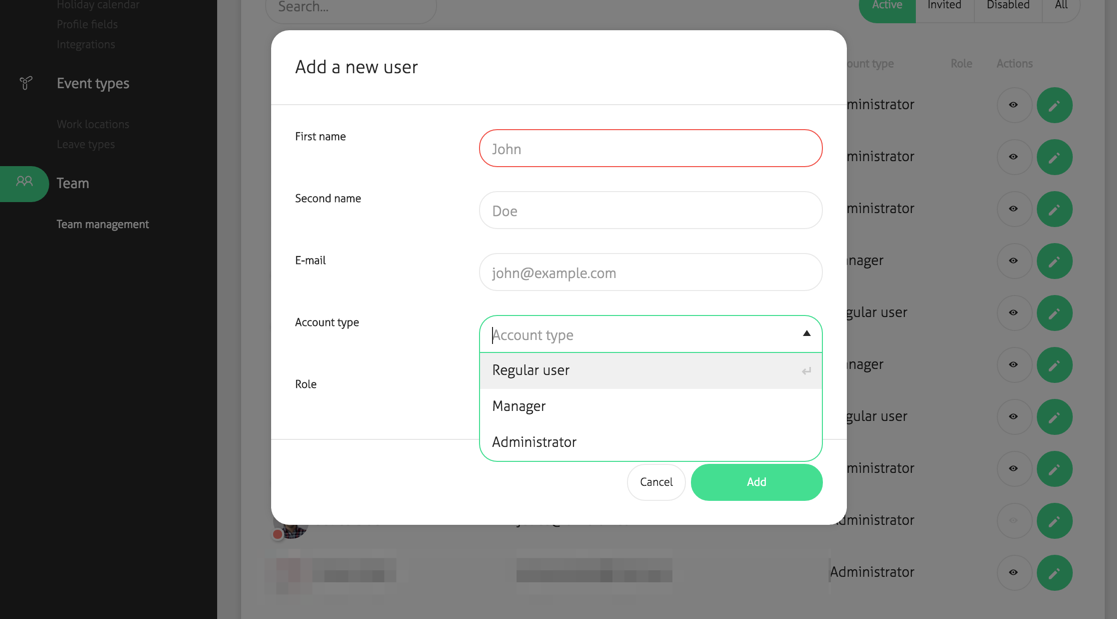
All users are categorized by categories:
- Active users (only active users, that might access timeION account)
- Invited (all pending unaccepted invitations)
- Disabled (all users you've previously disabled as an admin)
- All (all the types mentioned above)
If you are using Google Apps (Google for Work) you can send a link to all users so you won't have to manually invite everyone.
Check how to activate Google Apps integration here